Hi .NET Architects!
Visual Studio Setup and deployment Projects provides to make an executable or installer file in .NET windows application is easy and rapidly.
Visual Studio provides templates for four types of deployment projects: Merge Module Project, Setup Project, Web Setup Project, and Cab Project. In addition, a Setup wizard is provided to help step you through the process of creating deployment projects. You can see the templates and the wizard in the New Project dialog box under the Setup and Deployment Projects node.
The following are guidelines for choosing the right type of deployment project for your project.
1)Merge Module Project : Packages components that might be shared by multiple applications.
2)Setup Project : Builds an installer for a Windows-based application.
3)Web Setup Project : Builds an installer for a Web application.
4)Cab Project : Creates a cabinet file for downloading to a legacy Web browser.
5)Smart Device Cab Project : Creates a Cab project to deploy device applications.
This topic demonstrates deployment using a Setup and Deployment Project.
Setup Projects
Setup projects allow you to create installers in order to distribute an application. The resulting Windows Installer (.msi) file contains the application, any dependent files, information about the application such as registry entries, and instructions for installation. When the .msi file is distributed and run on another computer, you can be assured that everything necessary for installation is included; if for any reason the installation fails (for example, the target computer does not have the required operating system version), the installation will be rolled back and the computer returned to its pre installation state.
I. Create Setup Project
The following steps will gives the elegant guidance to create an executable or installer file.
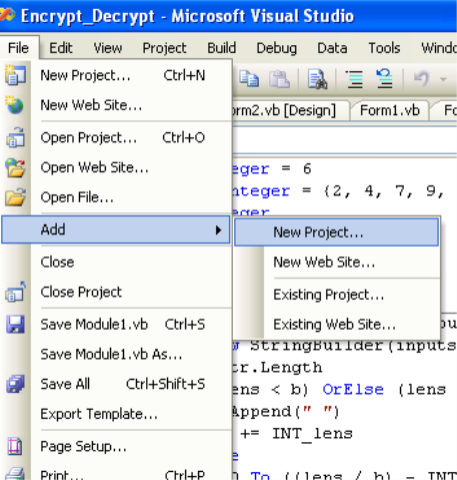
1. Go to file menu > click Add > new project >now “Add New Project” dialog will appear.
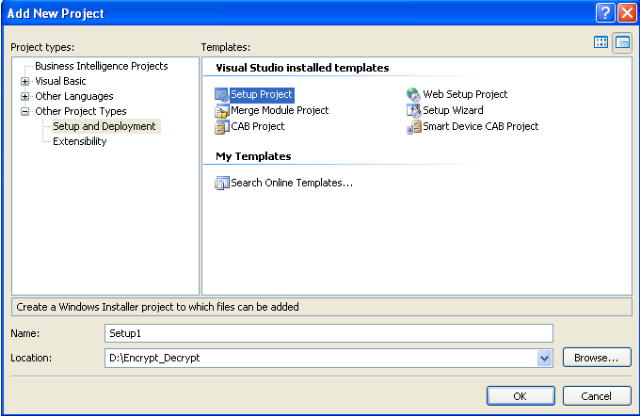
2. Select the “Other Project Types” and click “Setup and Deployment” projects,Choose “Setup Project” give name project name in name text box finally click OK.
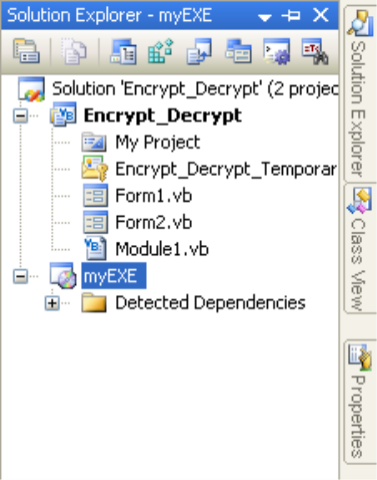
3. New project appear in solution explorer,for eg., you have give the name “MyEXE” file will be displays with given name.
4.Right click the MyEXE > go View > click “File System”

5.You can see the “File System on TargetMachine”under three folders
Application Folder
User’s Desktop
User’s Program Menu

6.Select Application Folder and right click Add>Project Output>select Primary output

7. Select User’s Desktop right click on the right side pane>click create new shortcut>select output file from Application folder>change the file name from primary output name to MyEXE

Next >>

Same procedure follows the user’s program menu also
8.If you want to change the Manufactures name, just right click the project go to properties

Change the properties as per you requirement
9.Finally Build the new project

11. Select the Release folder for build. (Select ‘Properties’ in right click of Setup Project)
12. Set the Compression Mode
Mode 1: Optimization for speed (Installation Speed)
Mode 2: Optimization for size (Setup file size)
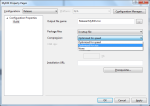
13. Once successfully build the setup. Please look up in inside Release folder
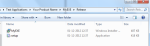
When you want to install the setup file or exe file on the client machine, before you should be installed .NET Framework on that machine because, Applications and controls written for the .NET Framework v2.0 requires the .NET Framework Redistributable Package version 2.0 to be installed on the computer where the application or control runs. (Framework 4.0 need .NET Framework 4 Client Profile).
#1 .NET Framework 2.0 Redistributable Package Downlaod
#2 .NET Framework 4 Client Profile Downlaod
II. Create shortcut icon in User’s Desktop, User’s Programs Menu and Add/Remove Programs
Note: System support only .ico file format
a. User’s Desktop
Step 1: Add an icon file (.ico) in project
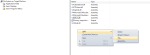
Step2: Select the icon file
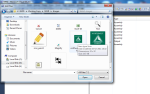
Stpe3: Icon file added in Application Folder
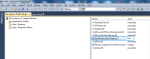
Step4: Select ‘User’s Desktop’ or ‘User’s Program Menu’ and right click on right side pane

Step5: Add primary output of actual application and click ‘OK’ to select

Step6: Rename the actual name to your desired project/product name

Step7: Here the sample product name is ‘Your Product Name’ for demo purpose

Step8: If we want to add icon on shortcut, Click Properties Window

Step 9: Select Icon, next Browse icon file

Step10: Browse icon file in Application Folder

Step 11: Click ‘Application Folder’

Step 12: Add File button will be enable once you have clicked the Application Folder
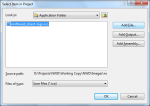
Step 13: Select your product icon and Click ‘OK’
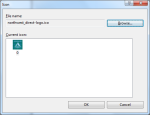
b. User’s Programs Menu
Kindly follow the same steps for shortcut added in User’s Program Menu.
C. Add/Remove Programs Icon
If you want to add your icon in Control Panel > Programs >Uninstall, You need to follow the below steps.
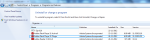
Step 1: Select the setup project in Solution Explorer and right click, select the ‘properties’
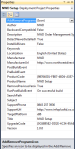
Add the icon from Application Folder.
View Icons
Install your setup in target machine, You can view the shortcuts in Desktop, Start Menu and Uninstall Programs.
Figure 1: Shortcut icon in Desktop

Figure 2: Shortcut icon in User’s Program Menu
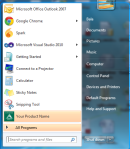
Figure 3: Shortcut icon in Uninstall Programs

III. Add Prerequisites
Prerequisites are provide support resources to run the installed process on your target machine.
Visual Setup and Deployment projects are automatically detect the required prerequisites need to install the system. But the question is what is the source for install the prerequisites? No need to worry, Visual Studio IDE provides three options to install the prerequisites on your system.
- Download prerequisites from component vendor’s website (default option)
- Download prerequisites from the same location as my application
- Download prerequisites from the following location
How to add prerequisites in Visual Studio?
1. Select Project in Solution Explorer, Right click

2. Click the Prerequisites button in Property Pages

3. Select the required prerequisites from the window

Click ‘Ok’, prerequisites will associate based on your install location selection.
IV. Setup file User Interface customization
If you want to customize the installation process screens. Visual Studio provides facility through ‘User Interface’.
Right click of setup project, Select View and Click ‘User Interface’.
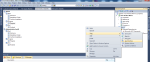
Here, you can see the hierarchy tree of installation process screens.
a. Add new dialog window
Step 1: Right click desired selection, Select ‘Add Dialog’
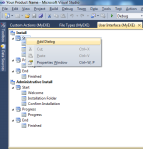
Step 2: Select the dialog which you wish to add
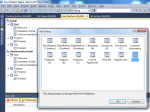
Step 3: New dialog added
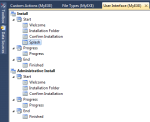
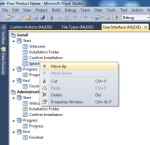
b. Re-order the Screens
Right click of desired screen which you need to move the specific place and select ‘Move Up’ and ‘Move Down’
c. Change the text and banner images
Right click and select the ‘Properties Window ‘ where you need to edit the text and image.
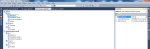
Once you’ve complete the changes and ‘Build’ the project again. Now, you setup file is professionally ready.
V. Prevent Multiple Instance Running.
How do avoid multiple instance in installed application?
In Program.cs file add the below code.
 static void Main()

{

   Application.EnableVisualStyles();

   Application.SetCompatibleTextRenderingDefault(false);

   Process[] process = Process.GetProcessesByName(Application.ProductName); //Prevent multiple instance

if (process.Length > 1)

{

   MessageBox.Show("{Application Name}  is already running. This instance will now close.", "{Application  Name}",

   MessageBoxButtons.OK, MessageBoxIcon.Information);

   Application.Exit();

}

else

{

   Application.Run(new <Initial Form>());

}

}
Help me to improve better by sharing your feedback here.
Thanks!
- .NET Create EXE
- Add Prerequisites .NET Framework
- Add Prerequisites in .NET Setup file
- Add Prerequisites in Visual Studio Setup and Deployment Projects
- Add Prerequisites in windows forms application
- Add Prerequisites of .NET Framework in Visual Studio Setup Project
- Add prerequisites of dotnet framework in visual studio setup project
- Avoid multiple windows opening in windows setup project
- Build setup in .NET Windows Application
- create a setup project in visual studio 2008
- create a setup project in visual studio 2010
- Create an exe or setup file using Visual Studio
- create desktop shortcut
- Create EXE
- create exe file in vb.net
- create exe file in Visual Studio 2003
- create exe file in Visual Studio 2005
- create exe file in Visual Studio 2008
- create exe file in Visual Studio 2010
- Create EXE or Setup File in .NET Windows Application
- Create executable file in .NET
- Create Installer
- create msi file
- Create setup in .net windows application
- Create setup in visual studio 2003
- Create setup in visual studio 2005
- Create setup in visual studio 2008
- Create setup in visual studio 2010
- Create shortcut in .net setup file
- create shortcut in user's program menu
- Create shortcut in windows application
- Creating setup with prerequisites
- Customize User Interface in .NET setup project
- Framework Prerequisite Setup Project
- How to add prerequisites in visual studio .net 2005 setup
- How to create an EXE using Visual Studio
- how to create exe file in visual studio 2012
- Make EXE file .NET
- Prevent Multiple Instance Running
- Prevent multiple process running
- Setup And Deployment With Prerequisites Included In VB.Net 2008
- System requirements
- Windows Application Multiple Process
 explore .net
Thanks a lot. It helped me.
How to add .net framework2.0 within package. Pls help.
Thanking you in appreciation
Pratap557
Thank you very very much.
I really want to learn it from long time
Thank you very much once again.
Thanks
Thank you so much.. but after I Installing setup on client machine there has no security provide. under installation files exe file is running on any machine if we get first time product key..
exe file running without product key on any machine. how to permanantly invisible this file or protect this file with the password.. please get me help
i want to create setup file with sql database .
rlz replay
Hi
Thanks. It helped me a lot.
How can make my exe application to create a shortcut or icon on tray?
Please help me
Thanks
Shobha
I AM NEW IN C#.NET .PLS I WANT URS HELP PLS SUJEST ME.
please u leave c# platform and join PHP this a very simple plat form
Thanx a lot dear. It’s easy to use and implement now i can explore it.
Thanx and Regards
Kailash Dhondiyal
It’s so easy to implement it. u r a genius.
Thanks
wongloon
How to use this procedure If i using COM component
AD
Hi,
A very Good way of expressing , that How we create the exe file in Windows Application ….
So,
Very Special Thank to ur Team….
Bye ! ! ! ! !
Wanna some useful tips for gridview , I have bind the data but wanted some professional look and also some Images will display And address in taken from the database so how could i do this ..??
For better Formates and looks of datagrid ..?
Also wanted to know how to use Paging in DataTable
if i bound tha data with DataTable control in asp .net page…..
how to validate installation with product key
nice explanation
Thanks dear,
it helps a lot really.
dgg
Dear sir,
Thank you for the useful Information. Please tell me how can i create Setup file if my apllication contains Database file. I connected my database through Sql Server. Please help me. i also created dataset in my project.
Thanking you,
thanks a lot.
It has helped me to do my work much better.
Amit Sharma
thanks a lot.
It has helped me to do my work much better.
Om Prakash Yadav
Hi,
First of all thanks to the wonderful post.
Got some doubts, How to include Microsoft SQL Server 2005 in this setup?? Also i need to include crystal reports also…
Would be great if u help me out…
It is very useful thread
hi i want to attach databse with exe file how i can do it
please help me.
Hey you got the answer?
It very useful for software developer. Thanks a lot for this article.
Rajeev
Software Application Engineer
http://www.tech-soigne.com
hi…
thanks for the article …
I need some help…
My project is with VS2005, SQL SERVER 2005.. and crystal report too..
How can i add these into the setup files…
a quick reply will avoid my trouble..
I already developed the project … What should I do to install my application to the client machine which has only windows OS installed..
this is my first project … please provide me a solution from the base…
Thank you
regards
edwin
Hey, I want to attach database too, with the setup..
Any suggestions?
u can attach a database by adding it in the application folder of File system.
Hello..
First of all i want to say thank you for giving such a nice and step by step article.Now i can create EXE with the help of your article ,you made it very simple now.
Thanking & Regards,
Uzair Aziz
thank u very much , for Setup steps
qwcqwcqwc
Thanks a lot. It helped me a lot.
How to add .net framework2.0 within package. Pls help.
Thanks…… it’s i very Useful for me…………
Thanks. Thanks a lot.
This article helps me to create setup file easily.
And also i want this article, to create the setup file with register key. It wil be more helpful for me. Thank u.
have u got setup with register key
HI mam.. Very to hear ..you got a solution for this.. Could you please send me the .EXE file which you have created..
Mam, I had developed a Notepad application in VS2010.. Now i am going to develop .EXE file for Notepad application.. I am asking your project for to improve My knowledge based on creating files..
thank you Mam
Thanks. Thanks a lot.
This article helps me to create setup file easily.
And also i want this article, to create the setup file with register key. It wil be more helpful for me. Thank u.
Good for the experts but not so nice for the begineers
Good publication, thanx Dude
It was realy helpful for me…i am begineer inC# .NET so plss tell me how to change the icon created after installation……
thanks & regards
shrawan
we can change the icon propery of the form before installation. (see property of the form)
Hi
Thanks for your document.
I want to merge an exe file(it is a patch of crystal report) to my installation.
When i add it as a file, it is not merged.
Also i am having that mentioned problem, about sql server 2000
Is it necessary to install client connectivity of sql server in client.
I am using .net1.1
Thanks
hi,
Though i know it, your way of explaining was really good…congratessssssssss………….
Thanks Explore.net
Thanks for giving me an right steps of creating an exe
thats really help me
Very thanks.
Way of explanation is good
hi
thanx for you yr docs .it is gr8 .but i want to set application installation path
how can i do it ???
thnx in advance .
hi,
Thanks a lot my dear friend…
and i have a doubut,how to add image(i.e icon) to our setup/exe ,it disply in desktop as notpad file.
pls help me pa..
@karthika
you will have to add the ico file from the exe properties. find the property ico and add the ico from the windows path.
question:
how to add .net framework 2.0 with the installer ??????? i think here no one has answer…..
Thanks
hi,
guys, when I create a setup file , Databae is not inbuild in it. I am looking any tell me me how database can inbuild within setup so I need not to paste it program directory and increase security of database.
need a quick response please. My project is under process.
man superb….thnks a lot……It’s so easy….
Please describe how to link database in this setup project
with sqlserver 2005
thank you
where is place DB in folder project .?
I add data base as Microsfot SQL SERVER DATABASE FILE
hi ,
thanks a lot my dear!!
thanks a lot
Hi ,
i m using Visual studio 2005 version in that i dont have this option…to convert exe file please help me to convert….
Hi All,
is there any way to create a setup for both web based abd windows application?
For example I have a project created in VB in windows and 2 VB.NET in web projects. I want to create a setup project which will combine these 3 projects.
Thank you in advance,
Selami Ozlu.
Dude, Thanks for the tips. There’s no way I forgot to thanked an article like this! Woot~
yo buddy, really it helps me a lot… thank you very much…
its coolll….
Hi,
I am using visual studio 2003 C# ,I want to make setup for
web application using SQL 2000 DB and crystal report what the step for setup and necessary files to install in client machine?
Please help me.
thanks a lot…!! it help us very much
Great thanks balanagaraj !
hai
thank you very much
it really helps me a lot
am studying mca…and tomorrow is my review..
you helped me a lot thank you friend…
thanks,,,,
Nice article…
Thank you for the useful Information. Please tell me how can i create Setup file if my apllication contains Database file. I connected my database through Sql Server 2005. Please help me
Hi Sameer, Please add your MDF file in to the BUILD project itself and give the suitable connection strings to acces the DB
Here you can get more informations about connectionstrings : http://www.connectionstrings.com/
thank you for your help, that is very nice article
hi…I already created the exe file but since my database is not included I can’t use the application…how can I include the db into the setup file??
Hi, Which DB you want to connect MDB or MDF?
i am using mdf …..db plz tell me how to add this …asap
thnks in advance
thank you sir,
sir i want to know is it necessary to install visual studio to run set up project
you are great …
i was worred about the my .exe file
thanx a lot
i can create the .exe and also i can setup it but i can not see the setuped program in my system ot other system it is being not working any setup as illustrated in yr site . please guide me how to work on it .
Thanks a lot, this is a big doubt that I had and your explanition make resolve it, good How To…
Thz a lot. It helps me more.
If you ever want to see a reader’s feedback 🙂 , I rate this post for four from five. Detailed info, but I have to go to that damn google to find the missed parts. Thank you, anyway!
Good Day Random,
Thanks a lot for your appreciation
Thanx a lot dear. It’s easy to use and implement now i can explore it…………………………
Nice, buddy. You have done a great job. I am doing my mca 6th semester trainings and i was searching for the answer which u have just narrated so efficiently.
Thanks a lot.
thnx the article was useful.
i have an app with a db..mdf included . i just did your steps. but when i run it ,it says
“An attempt to attach an auto-named database for file C:\Documents and Settings\Administrator\My Documents\Visual Studio 2008\aspnetdb.mdf failed. A database with the same name exists, or specified file cannot be Opened, or it is located on UNC share.”
what i shou do??
thanks you
hey did u find any solution for ur question? because i have also same error in my setup but can not find solution for it
Thank you very much for your effort. Excellent article
how to change connection string into EXE file when we installed exe onto client mechine i m using sqlserver2000 for database my project in Vs2005
my project is completed please help as soon as possible
how to change connnection string ?
thanks
neeraj
Thanks,
it helps a lot really.
Is it possible to make setup file for Mac Operating System. So that i could run my application there also.
No Priyanka, You cant run the .NET application in MAC OS. because .NET applications works only in Windows OS.
try this string but with wql express, its not big deal
Data Source=.\\SQLEXPRESS;AttachDbFilename=|DataDirectory|\\myDatabase.mdf;Integrated Security=True;User Instance=True
Thanks a lot.. great work
(“…”)
Hello…
When i install this newly created set.exe file, after installation application doesn’t start automatically. I have to start it manually. Is there any way to auto start the application after installation.
Thanks,
Priyanka
hii, can u tell me which files are necessary to be attached alongwith the application, so that it runs on the client PC. my windows app has database files (.mdf). So which files should i attach and how..?
pls help..!
The answer is YES, If your application embedded with mdf file. You should add the MDF file while creating the setup.
Myapp.exe.config file is created during installing setup?
how to remove it?
Myapp.exe.config is the configuration file where we store the configuration items like connection strings and customize attributes..
thax a lot frnd.
it helped me lot ….
Always welcome Rahul..
thanks for that i am very happy
Sounds great.. Thanks Anish
its great….working fine….thanks a lot friend….u r jenius…….
Welcome Raj and Thanks for your words about me.
Please give an article about how to create a setup file of windows form application Including the database in the setup file.
HI sir
Really This Concept Is Enough To Build A Set UP File.,but Add one Good Example With is the Good Example.please attach one Example.
Sure Anil,
I will add one sample application.
Thanks for your valuable feedback.
thanks….
this is very helpful for me….
A Very BIG THANX !!!!!!!!!!!!!!!!
i was able to make a setup file
Thank you
the steps are easy to follow, thanks
thanks we got help from this blog….
friends these steps are really working…..
THANKS A LOT….
Thanks a lot.
for making it easy.. it helps a lot.
Thank you very much…….. You are my hero of the day sir.
Thank you very much….. This article helped me alot
hi
LOVE KARAV MATE SHU KARAVU JOVE>>>>TE JANAVO>>>
Hello,
Very useful post,Thanks
I don’t have the setup template, how can I get the template? can find it on net!
Thanks
Hats off 2 u
Thanks dude!!!!
Its very useful
Really must say thanks to u dude!!!!!!!!!!!!
Thanks alot Really very much helpful information provided by you…………keep it on
I got an error while running the exe and msi files.
The error is ‘
“the folder path ‘.’ contains an invalid character”..
Please give me a solution as soon as possible.
thanks a lots of information to provide how can create an exe. in software.
Hi, I found this blog post while looking for help with Microsoft Silverlight. I’ve recently changed internet browser from Chrome to Microsoft IE 6. Just recently I seem to have a problem with loading sites that have Microsoft Silverlight. Everytime I go on a site that needs Microsoft Silverlight, the page does not load and I get a “npctrl.dll” error. I can’t seem to find out how to fix the problem. Any help getting Microsoft Silverlight to work is very appreciated! Thanks
hey buddy , ie6 doesn’t have the npctrl.dll file u must have to download that file…
try this link …
http://www.search-dll.com/dll-files/download/npctrl.dll.html
downloading this file may fix the prbl……
Great!!!!
how to attach database along with my set up and deployment hence the client can install the .exe simply
Thank you very much..
Really very good way of expressing..awesome
Please let me know how can we add product key dialog and validate it and a customized splash screen at the startup.
One thing not related with the same, but if anybody could help me with that please..
I’ve .snk files..now how do I attach those files to my C# Windows App to change the skin or any other way to change the skin
Thanks again..
How to include database files or databases while crating exe in .net ?
Thanks
Regards
Subhashish Dawn
Thank u very much
This is nice article.
This is nice one……….. but can u tell me that how to make a setup of an application with including database files of sql server…………
hai,
this is very easy to implement.bt can u tell me that how to make a setup of an application with including database files of sql ………………………………………….
http://btjunkie.org/torrent/Setup-Factory-v8-2-1-0-Serial-SETUP-h33t-Lopper369/2849366b5186539b419c91646ea039270c26603426b9
Use a software to create the setup its called Setup – Factory
its awesome …. cool…
Hi
First of all thank you for this nice article.
I just wanted to add .Net framework version3.5 along with my setup project.So, whenever I start the installation it needs to check the existance of .net framework3.5. It its not then needs to install the framework automatically by downloading from the site. Immediately after the framework installation needs to start the application installation. I have tried with prerequisites->download from the vendors site option. But there we need to install the framework manually by downloading from the MS site. Then need to start the setup again. But I need to do everything in one strech.
Could you please help me out to solve this issue.
Thanks in advance…..
thanx buddy
Hi,
Thanks for this article, I have followed the steps instructed by you and created the .exe. I have installed the SQL server in windows server and restored the database, now I am trying to install the exe file in different clients, but I am surprised that the application after installation only gets connected with remote sql server from my system and one another system but I am not able to connect the app from more than 2 systems, if I tried even it does not load the app, it gives the null reference error at login page load….
please help what could be the reason, I want a centralized database by which the several client can install my app and use the same database.
Hi Tarun, If you are using centralized/Remote database server for connect multiple clients, Just make your connection string as appropriate one.
Hope this helpful to you:
http://www.connectionstrings.com/sql-server-2005
Hi dear ,
Thanks a lot that your information help me a lot.Also now i created the .exe file of my own devlope .net application.
But could you tell me how to zip my database file with this exe file .I think it is possible but i don’t know how .
If you have using attached database then no issues to add the DB in to the exe and please make sure that you have given correct DB connectionString..
Just add attached DB files from your Deployment Project solution explorer
Hi,
Thanks for the info.
I have created and installed the exe successfully but when I try to open the application in the program files,there is no exe. It contains only the files which were in my project like .cs, designer.cs etc. Please tell me how can I see my exe running?
Hi, Make sure did you add primary project output file while creating exe?
first u check ur project in which drive then go to debug file…its always there…….
thank you very much its very helpful.
SOOO cool from 2007 till now active
very cute
Hi,
you can also try Actual Installer which is very easy to use.
Hi i need only EXE file to distribute to customer. I dont want the MSI file. So, how can i get the single EXE file ?
Hi, You can use build or setup tools to make a exe like Installshield, TeamCity.
thank you so much buddy
Thank you very much my dear friend….
Arish and Anil,
Thanks a lot guys..
Thanks bro…it helped me…. great post…keep up the good work…
I want to do with web application, set up and i want to have a icon, click and run the application.
Thanks a lot friend!!!!Its very helpful for me….
i made a vb.net project and it run completely. but when i made its setup and install it on computer then it not work properly.
plz tell me the solution of it.
Hi Ravi,
Can you please describe the issue which you are facing…
Hi,
its a good way to create the exe. Other option is to create exe is New Projet –> Other Project Type –> Setup and Deployment
a) Copy from existing project (bin –> Debug –> All Files Copy) and Copy in New Project (bin –> Debug Folder)
b) We need a shortcut for desktop and program menu. First we can right click on Exe (Create a Shortcut) then we can drag in User Desktop and then User Program Menu
c) After we can build the Application.
Setup Create is Finish
Vijay Kumar
singh24bpl@gmail.com
Great!!
It is really a help information.
Thanks
thanks for creating setup file
Hi !
Help me out plz. I hav made project which is in VB. Also I hav made Setup of that proj. nw i want to install my proj on client m/c . I hav already added connection string in app.config file.And while installing it on client m/c it gives error that sql connection not etablished..I hav also changed the old connection string to new one.what should i do nw?
Thanks
Hi, You should use remote connection string if the DB has located on some other place. Can you please show me your connection string? (rename the servername,login credentials for security purpose)
Note: We should change the connection string based on environment.
Hi,
I am a student. I developed a web browser using ASP.NET with C# (in Visual Studio 2008). Where WebBrowser control has been used. It is being installed only those system, in which a version of .NET Framework is already installed.
I would like to installed this one in any system. If system don’t have .NET Framework then the .exe file itself install the .NET Framework first and then install the related…
Is the idea work?
If yes, How? Please help me…
If any other idea is there, please help me…..
I am open get any sort of idea…
Thanks
Hi,
I am a student. I developed a web browser using ASP.NET with C# (in Visual Studio 2008); Where ‘WebBrowser control’ is used. Now the browser is being installed only those system, in which a version of .NET Framework is already installed.
I would like to installed this one in any system.
If system don’t have .NET Framework then the .exe file itself install the .NET Framework first and then install the related…
Is the idea work?
If yes, How? Please help me…
If any other idea is there, please suggest…..
I am open, to get any sort of idea…
Thanks
Sudip,
If you have planned to creating a setup file for your application, You can include the .NET Framework as prerequisite components in that setup file.
Or else, it will automatically detect the prerequisite and also it will redirect the .NET framework download page while installation.
The system which is going to install your application should be contains .NE Framework while before installation.
Hello Pls help Me ,
I am create the Stock Project in Desktop Apllication, i have 5 Tables abd 20 Stored Procedure ,So when I make .exe file then i create Error As “Logined fail to abc/sqlexpress” In another Computer…I think We cannot Attach Tables So how We solve this problem ..We also make .mdf file but in this file cannot save the record in tables.
thank sir,
sir i wanna add some pictures so how can i add pictures and images in the setup wizard
sir, i’ve developed an application using vb.net…… but i am not able to add the code for shortcut on the desktop while it is being installed in any computer……
plz help…..
Hello Dear All
I’m Sharad share with u a lot of thighs.
sharad.d.smart@gmail.com
A good article.Its very helpful..
Thanks a lot
thanx alot dudeee
u r absolutely genius
i think u r eat parle G
thank u brilliant but one doubt i’ve database connection in my vb.net application i follow ur steps but how to include my database in that exe file it showing error when i installed in client system
I created the setup file for my project in c#.net. I installed this in another system. But i can do all the process in my project without Sql Server 2005. How can create setup file with Sql Server2005…
Please Help Me…
Thank You,
Malar.
I created the setup file for my project in c#.net. I installed this in another system. But i can’t do all the process in my project without Sql Server 2005. How can create setup file with Sql Server2005…
Please Help Me…
Thank You,
Malar.
Thank you. This information has contributed to the development of my application tremendously. Please keep up the good work.
thank you very much……Sir
at last i got it from u
thanks a lot………again
Thanks a lot. It helped me.
How to make setup that it can only be installed on one and only one computer. Pls help.
Thanking you in appreciation
Manoj
Using system’s machine id..
Try this..
after installation in main form/ splash screen load()
* Get the machine id(mac id) from system.
* Store the machine id in centralized/server db.
* If the key already exists, alert the warning message to user and exit the application
Respected Sir,
Here by i have created a vb.net 2008 windows application and sql server 2000 as back end.
now when i have deploy the application and try to run on other machine then the application doesnt run and connection error occurs . I have written connection coding as
cn = New SqlConnection(“initial catalog=database name ; integrated security = true”)
so when i install the setup on another pc then the login id and password form doesnt appear on the master page which has the property IsMdiContainer = true
I have install sql server 2000 and .net frame work the same version which i have use on my pc . and more over I have created the same database which i was having on my pc. so now what to do in this case !!
Thank u, so much sir,
Its very useful to me..!
Hello sir,
I want to change the icon in the exe file .
How we do? help!!!!!!!
After created Desktop/Program files short cuts..
1. Right click of short cut
2. Select ‘Properties’ window
3. Browse the icon file
4. Set the icon for setup
But icon file should be extension of .ico
I also Want to add Database File In Application At the time of setup creation can i add , To avoid installation of sqlserver give if yes Give Me Answer,
Thanks…
rrwrr
bakwas
thanks for the coding
happy new year
Thanks for help…
And Happy new year
Hi Balanagaraj,
It was a good explanation. I am on my way in developing Outlook Plugin, and i followed all the things explained here to develop the setup. But, After the install when i started the Outlook, the plugin was not even found. I am also using Web Service along with this plugin, in such case do i want to follow any different steps to create the exe.
Thanks in advance for ur ideas
Hi,
I have developed a vb.net application which uses an external device. I wanted to know if there is any way to create the setup so that the device installer is included in the setup and when we install the application on any PC, the device installer also gets installed automatically.
Any help would be appreciated.
Thanks and Regards,
Neeta
No Idea………….
Hi guys
you can add sql server2005 to ur projectbefore creating setup… to do so u have to keep ur database in bin folder and change ur connection string in Appconfig as
test_db.mdf is ur sql database name which u kept in bin folder and after that add all this to ur “Application folder” and build ur project to create setup….
“”
add key=”ConnectKey” value=”Data Source=.\SQLExpress;Integrated Security=true; AttachDbFilename=|DataDirectory|\test_db.mdf;User Instance=true;”
And also i request author of this artical to ensure is it a correct way , because it creates permission problems some times and i am not able to save records to my database file from my installed application
Thanks & regards
Alish
It shows me blank in the Primary Output Folder so what to do plz help me out.
adv. Thnks
thank you so much…..!!!!!
Hi,
I have created a Windows service and i followed the process to create installation set up for the same.
i have generated a solution and converted into exe format, i need to refer this exe file (dependency file) in windows service and provide single installation set up. so wen i run the installation set up, first my windows service will get installed following it, the solution exe should get in!stalled automatically.
Thanks!!
Thanks a lot!
hi,
thanks a lot, this article helped me to create set up file easily.
continue to wrire more articles like this one.
bye
thanks, it was really good. I will be very thankful to you if u guide me about the database?????? Is data base files are necessary if a system has not SQL server and visual stuudio then my project will work on that system or not.?
bache ko bhi itna ata hai
What about if i want to install another executable
Set RemovePreviousVersions = False in setup properties
thak you so mush ,,
for hepling
I like this article , But i need you help how to attach database in setup project. and i also did that. it is working fine in my system but not in the others system. and that system not have sqlserver 2005, dotnet 3.5 etc.
Thank you for your reply
Add database(.mdf) in setup project > view > file system.
But you should change the connection string according that.
(use attached db connection strings)
Add database(.mdf) in setup project > view > file system.
But you should change the connection string(use attached db connection strings) according that.
Dude thanks lot.. have made an EXE.. but kindly share that how to create a serial no for our EXE and all… i would like to create with MAC based EXE.. so pls..
1nce agn thanks!
Try this..
after installation in main form/ splash screen load()
* Get the machine id(mac id) from system.
* Store the machine id in centralized/server db.
* If the key already exists, alert the warning message to user and exit the application
how to change connection string into EXE file when we installed exe onto client mechine i m using sqlserver2005 for database my project in Vs2008
my project is completed please help as soon as possible
how to change connnection string ?
thanks
After installation,
1. You can find ‘applicationname.exe.config’ in installation folder(:\Program Files\Product).
2. In that .config file, Change the connection string and save it.
3. It will work fine because .config file is editable and no need to rebuild.
How can we give exe.Config file to client. we should not give conig file as client or anyone can mis use it and remove the data.
so how can we change the connection string? i am a beginner so plz help me out to understand the concept. according to me we should not give config file to anyone. M i right?
hi…
thanks for the article …
I need some help…
My project is with VS2005, SQL SERVER 2005.. and crystal report too..
How can i add these into the setup files…
a quick reply will avoid my trouble..
I already developed the project … What should I do to install my application to the client machine which has only windows OS installed..
this is my first project … please provide me a solution from the base…
Thank you
regards
edwin
hi…
thanks for the article …
I need some help…
My project is with VS2008, SQL SERVER 2005.. and crystal report too..
How can i add these into the setup files…
a quick reply will avoid my trouble..
I already developed the project … What should I do to install my application to the client machine which has only windows OS installed..
this is my first project … please provide me a solution from the base…
Thank you
regards
Rakesh Ramani
Hi, Setup project will automatically detects the project dependencies and it will include the dependencies from application project.
# You can find the ‘Detected Dependencies’ tree view in your setup project. So this dependencies will place in client’s system when installed the setup.
Hi, i’m very happy of this explanation. very nice.
Thank you much
Regards
Adhil Musthafa
Thank U Sir. Thanks a lot for giving this answer in details.
Thank you for your information Sir
Great Tutorial! This helped me get rid of the error: C# App Install Error – Microsoft.visualstudio.hostingprocess.utilites.sync version 9.0.0.0 missing from Global Assembly Cache (GAC)
thank u very much
thankssssssss
Thanks a lot….this forum help me a lot in my carrier
Hi Guys
Thanks very much for your constructive instruction on hwo
to create seat up file.
But i have one question more, what if my project have
several reports and i want them to be see for print
when i view them.
So where can i put those report in Application folder, User
desktop folder or ??
hi,
i want to know that how can i make setup of windows application in c# with database in sql server 2005 & setup must be run in any computer
hi,
i want to know that how to make setup in c# windows application with sql server 2005 & setup must be run in any computer without error
i got What was want ! so thanxxxxxxxxxxxxxx
good work!!!
improve your productivity!
great thank u..its very useful for me
Hi,
I want to know the steps for making smart device cab project. I am encountering an error if i follow the above procedure.
Error: Section [Version] key “Provider” requires valid data
ERROR: The Windows CE CAB Wizard encountered an error.
thank u very much
but i can to show the software for run it
Hello sir i want to create setup file in vb.net.this setup file run in windows without .net support.Is it possible?So how it is.plz help me
Hi Sushant,
.NET framework is a platform for all .NET applications. So .NET based applications require .NET framework for execution. You can use .NET Framework Redistribute package(free) for client machine installation. Without .NET support its not possible.
Let me know if you have any other queries
thanks a lot for such a valuable help in a elegant manner. i was searching for this solution from a long time and u porovide a very interesting way to create the detup …….. thanks .
nice article sir..
i want to change the installation look of .net because it show like a general software.. .can we do it?????
Yes, we can make it looks like a professional installation setup using Custom Actions.. Let me explain through my next post..
Amazing, it was very helpfull, detailed steps, just what i needed.
Thank you
i hav developed a project in C# windows application and i converted tis application into EXE file.. And i hav called that EXE file from ASP.NET Web application. it works in client side.. but it doesn’t works on server side …no error too. it just loading 4 long time until we close…. i have tried many times no solution so fr.. help me for the solution as soon as possible.. here is my code in ASP.NET
// CODE
System.Diagnostics.ProcessStartInfo startInfo = new System.Diagnostics.ProcessStartInfo(Server.MapPath(“EXE\\aa.exe”));
System.Diagnostics.Process pStart = new System.Diagnostics.Process();
pStart.StartInfo = startInfo;
pStart.StartInfo.RedirectStandardOutput = true;
pStart.StartInfo.UseShellExecute = false;
pStart.Start();
pStart.WaitForExit();
// CODE
here aa is 1 kind of EXE file.. i need tis converted EXE file should be run on server side of ASP.NET web Application… idea plz
Hi Balanagaraj,
I am developing one Windows Application in C#.Net with MS Access Back end. In this application i am going to make Web setup project EXE file for using different systems in network. If i enter the data by using that EXE file in different systems means shall i get the all systems data into server system?
Could you please let me know.
Thanks in Advance.
Naresh
Make connection with centralized database server.
1. Create database and table
2. Setup project should connect with centralized database
Hi I have some similar issues, I am using Mysql database c#.net created windows application.
Now i want to create 1 setup file .from which all required database files and crystal reports are automatically install and ready to use in 1 click setup. Please send me detail for that.
Right now i can create setup but showing some error regarding to MySql, and form does not getting data from database when i install application to client computer. I think error is because of it cant find database or server or connector issue.. please let me know ASAP regarding that.
Hi, Can you please clarify my question?
Are you going to embed MySQL DB with application and distribute to all clients OR Using centralized DB and All clients will connect your centralized DB?
thanx alot dear,this is very impressive and simple solution that you have explianed by screen shots,its helped me alot
Thanks a lot for your generous to posted this great tutorial. And also I want to say thanks for anybody who submitted the comments. I found the way to install the application without any SQL Server things. It runs smoothly on my client computers. Two thumbs up for this ^_^
Thanks for the post i needed this help , saved me lots of time
Sumit Sharma:
hey very good way to explaning .exe file..
thanku very much
Thank U !
This is very Perfect. This is very simple way to convert the exe file. who he/she is the write this post, lot of thanks……….., (WITH LOVE) by THANGARAJ
Hi Balanagaraj,
It was a good article. Thanks.
I need some help..
I develop my .exe file with vs.net 2008 & windows xp pro. I can run my .exe file in my computer successfully but not in other OS. Is it any other way that I can run my .exe file in various OS(such as windows 7) without running setup.exe? just the application will do?
Hi,
Did you add “Prerequisites” in to your setup file. Please see III. Add Prerequisites.
The following prerequisites need to install
1. .NET Framework, 2. MSI Installer
Also, .net setup file will run all OS versions in windows family (above Windows98)
Please check ‘other systems have installed with these prerequisites’ or not?
thank you very much…….
Sir, I was successfully create the MYEXE file. it is run on only my computer. but does not run on other computer..
Please Help………………………,
How to solve this problem……….,
Hi,
Please let me know the error you have faced?
good representation…………….
Thankyou so much Amit..
say me how to create a activation key for the setup file.. the installed application should expire within some specified time and it should ask for the key to activate it and use forever…
so that i can sell the application to others for money.. they can use it for some days and if they like it and want to use it forever means i can get the money and give the key…
send the info to my mail
hey thanks a lot
but when i right click on the application folder(6th step) and click on add project output I can’t find primary output in the list………..
plz help me out as soon as possible
thanks…………..
hey thanks a lot
i use visual studio 2010 ultimate version
but when i right click on the application folder(6th step) and click on add project output I can’t find primary output in the list………..
plz help me out as soon as possible
thanks…………..
Hi,
Thanks for your inputs.
Did you build the application? if yes.. it will be create a primary output file.
If you add ‘Project Output’ from right click of Application Folder (Follow the steps #6) it will add automatically.
Please re do the steps correctly and get back to me.
thanks for the reply.
I have done the steps many times but it doesn’t show the “primary output” in the list…..
Can you please tell me how you build the application………
again thanks
Can you please answer the Question that “How Frame work and the applications Setup one click ” instead of going venders website or install seperately. i have noticed that so many pepole asked that question but you are not answered it.. i too have that doubt , i need to create a package which should install framework first then the application, i dont want to go the venders website and nor want to install seperately, when the user click the setup it should install framework if not installed and then the application.
please answer ..
thanks
Edward
Very good explaination
Hi , Thanks for the article. It help me to prepare a setup for window application very easily and quickly.
Thanks again 🙂
somebody explain me how to add extra features in setup like only valid for 10 days or 20 logins in window application in .net
Hi,
I’ve propose a solution for your needs.
1. Create a centralized database for registration management
2. In your windows application, Splash screen or MDI form load, Verifying the following logic.
# After Installation, get MacID or Machine identification number from Client system and Store your centralized database.
# Calculate start date and expiry date (Start date + 10 or 20) and update the flag IsExpire = true
# Verify the MacId and Corresponding IsExpire field
# If yes show the expiry message window
# Else, allow used to proceed
Please let me know your comments.
Thanks.. But this is not working with the application including SQL database.. How can I deploy a project with SQL database, so that i can install and run my project in other system..
I’m writing an app in C# that should work on Mac. How to make the setup? I have installed Mono.
Hi, .NET app won’t support mac os. compatible only for windows family.
Instead of creating windows application. you can use as web service or class library.
Hi.How to setup and deploy win application with sql 2005.
sir,
you are supper star in this field… , i can learn more and more from your post and question-answer…
this step very helpful thanks for that
Hi ,
I need to use registration key concept during the window based application. Do you have any idea ?
Hi ,
I need to use registration key concept during installation of window based application. Do you have any idea ?
i have one third-party exe file i want to attach in my setup.. i am attaching but when i am installing third-party tool only installing. my application is not installing.. how to install both things..
please help me
Thanks in Advance.
Bheema Sekhar
hi bheema when ever you create setup your project than
you need:-
1>download .net framework
2>.net framework 3.1 or any version than install it third party pc
3> than install your project
4>your software run on third party pc
Add your exe as primary output and consider third party exe as attachment.
how did we create .exe file with license key/Product key
example will be gorgeous if you show how to include a data base in it
so now my problem is
framework 3.5 visualstudio
sqlserver 2005
setup build including sql file .mdf
after installation on execution
error is
you are attempting to open a file of type’sql server datbase Primary data file (.mdf)’
these files are used by operating system and by various programs.Editing and modifying them could damage your system.
if you still want to open the file click open with otherwise click cancel
please resolve as soon as possible
umeshsinghgarg@yahoo.co.in
Very useful Information Document Notes
very Useful information
thanks a lot it really helped me with my studies
thank u sir
@balanagaraj
Please I have aproblem in My application which is develop by c#2010 and Sql Server 2008 and crystal report 11
This is the tool which I Develop with It
My problem is that when I Prees on the button which Display the report there is amessage “Fail to open the Connection data base vendor code 18456”
But all of the project Work Perfectly . and this is the app.config
Notice that when I attach the data base on Sql Express the report run perfectly but in case of writing attachdbFileName=d:\EXCompany\EXCompany.mdf in app.config
It appear this message “Fail to open the Connection data base vendor code 18456”
Please tell me in eng_ahmedselim@yahoo.com
@balanagaraj
Please I have aproblem in My application which is develop by c#2010 and Sql Server 2008 and crystal report 11
This is the tool which I Develop with It
My problem is that when I Prees on the button which Display the report there is amessage “Fail to open the Connection data base vendor code 18456”
But all of the project Work Perfectly . and this is the app.config
Notice that when I attach the data base on Sql Express the report run perfectly but in case of writing attachdbFileName=d:\EXCompany\EXCompany.mdf in app.config
It appear this message “Fail to open the Connection data base vendor code 18456”
@Selmish,
Did you provide the valid connection string for attached DB?
For ex: “AttachDbFileName=|DataDirectory|\data\YourDB.mdf;integrated security=true;database=YourDatabase”.
Check this reference : http://www.connectionstrings.com/Articles/Show/all-sql-server-connection-string-keywords
Please let me know if you require further details.
@balanagaraj
thank you very much eng.@balanagaraj For Your Response ;But still the problem already exists and I Suffer From This Problem , and My app.config is
when I run My application and i press to view my report , i have message says( Faild to open the Connection) please help me to solve this problem
@ balanagaraj the app.config is
”
“
@ balanagaraj please send to me Your mail as my Comment is not appear totally and as the app.config is not disappear although i write it in my Comment
please send your queries to balab4u@gmail.com
very very thankssssss..
I am having three projects linked to each other through add references and a common solution …….i want to create an exe for the whole solution but the primary output shows only one project only …….
help required asap ….
Thanks In advance
Hi
Create an exe for primary project, Setup will automatically add the dependencies and references.
thank u so much 4 providing this…..
hello sir
sir, i developed one app in c# and i used MSChart in that application, setup and deployed the application. But when Installing application in client place chart is not displaying. Wht may be the problem. wht i hv to do sir?
hi
How to generate the registration or serial key for our application for single user.
Please help me sir. Thank you in advance
I WAS CREATED .MSI AS YOU DISCRIBED ABOVE.I USED ACCESS DB MBD FILE AS MY BACK END.I GOT ERROR “PHYSICA PATH NAREN.MDB WAS FOUND”.HOW TO SETUP MY PROJECT WITH .MDB FILE. PLEASE SEND ME SOLUTIONS TO MY E-MAIL.
Add db as attached database through Visual Studio.
i am new to dot net window application.Could u help to find out solution to make application compatible for all operating system……..
thanks in advance…
At present .net supports Windows OS family only. because .NET framesworks compatible with windows OS only.
Thanks for such a wonderful explaination…
🙂
helped a lot…
Hi, I want to know how add another .exe file and set sequence of installation.
Thanks… it helped me a lot 🙂
Thanks alot for youe detailed description, it helped me.
thanks sir balanagaraj u helped me as unforgetable thank u more than 10001
Thank u so much for this upload… These steps completed my MCA project….
Thanksssssssssssssssssssssssssssssssssssssssssssssssssssssssssssss
I have added my .mdf file with in the exe setup file itself…
Is it possible to install and access the application in another computer with out database installation?
pls help me…….
Hi Sreebanraj,
If your application setup inbuilt with .mdf file then no need to install SQL Server in target machine. But you should install .NET Framework on that machine. .NET framework installation will provides native support service for SQL Server.
thx sir, it help me alot..
i build setup project with attached database and i install it on my pc..
but when i stop sql server service..my application cant access the database which attached to my app..
it means that a client need to instal sql server to run my application??
or as u said above that .net framework installation provides native support service for SQL Server.
so sql server service “wrapped” as one with .net framework installation(SQL Server)??
sry for my bad english
thx in advace
Thanks bro, your article is very help to make setup file for me windows-based application
hiiii….plzz help me how to add sql server database file in c#.net setup & how to make a fresh c#.net setup exe which include sql databas
e
how can we attach database with exe.
awesome wonderful superb nice good. bro thanks a lot yaar bcoz this tutorial helps me a lot….
that was not so helpfull sir…..plz can u show some demo video or any pdf
thanks,
i am creating setup and install it but it displays error of oledb(database connection) so, please tell me how to connect access database with setup
thank you,
Extremely helpful ,
so thanks again……
But My Report Is not yet working could u help me
hi,
I have create the project in vs2008 with sqlserver 2005 and successfully run the inbuild pack.
when i use the sqlserver 2005 mdb file in vs2010 project the set up will works on the developer machine and its not in client machine .
I installed .net framework 4.0 in client machine .
Is any other prerequest is needs to add in the client machine?
Thanks,
Selva.
Hi ,
This works out bt can you plz tell me that how to attach an ms access databse with my set up file?
I created an set up file successfully but i am not able to attach my Microsoft Access database with it.
I really need an help..
Thanks in advance
Hi ,
Please i need to know how to write an installer class in C# that will create a database and tables on the client machine when the program is being installed. Have really tried but i only end up being able to create the database but cannot run the schema against the new created database to generate the tables.
Hi do you have a dictionary form i want to make my own dictionary but it not run well. i use VB Expess,some thing like when i restore down or maximi the the picture and text box including the words it not reside with the “restore down or maximi”it mean wnti draw the text box or picture 100*200 when”restore down or maximi” it not fit the side automaticaly. 1 more thing when i debug it in to app file it run on my computer but other computer it not run or it show dialog box “not safe or untruse file”
Great tutorial..really loved this..
Really appreciate you hard work on this…great stufff
2121
hello sir your tutorial is really nice
i know these step already my problem is
how i can attach database to my exe
i put it with primary out put in project setup
it goes there but it doesn’t establish the connection
i am using app.config
please help me
it is my very old problem
umeshsinghgarg@gmail.com
i haven’t read your all replies in this article if you explained in replies
because they are very much
please reply soon
wonderful explanation… it was more useful me. thank u so much
it really helpful
Yared Ethiopia @ NBE
Thanks a lot . It helps me to create set file with desktop shotcut.
How to create a log file while installing this setup
Thanx a lot!
it did helped me!!!
Hey hiiii,
I have one question that i want to create a project in which i want to execute an .exe in it……
like there is a window form in which i have 2 buttons ->> shutdown , restart ……
Now when i click on it shutdown ->>> shutdown.exe will have to be executed……. plz reply as soon as possible……
Hi Ankit, Sorry for the delayed response.
Step1: In shutdown button click, use this code ‘System.Diagnostics.Process.Start(“shutdown exe path/shutdown.exe”);’
Step 2 : Attach the ‘shutdown.exe’ with your setup project
When you click the button, it will invoke the exe.
hey…..
tnx a lot…..it didwork…
Thanx alot……u r great………..
wow its amazing !!!
i really liked this , this gives us the complete instructions to create any type of setup files.
thanx a lot…………
How to attach Database while creating setup file.
i still have the same question that how to attach database while creating the setup file in c#.net and backend as sql server2005
thanks man……
This setup program install application only for current logged in user of windows. But i want to install my application for all window user on a single pc in once and don’t want to re-install it one by one on a single pc. How it could be possible?
Thnx.. But can we reduce the size of exe.. if we used to add framwork and crystalReport so size inceased upto 200 MB..
This is really helpful.
Thank you very much
You’re welcome!
Plz Help!! 🙂
Mai Chandra Prakash Hoon B24e Wala… 😀
Really Very useful . Thanks a Lot.
Great.It was very useful.Thank you so much 🙂
i have created a setup using visual studio 2012 with sqlserver 2008.
that setup is working correctly in my machine but whenever i use it in another machine , it shows an error while fetching data from database ……..plz help !!!!!
Please check your db connections in app.config. Are you going to use centralized db or individual db?
Hello balanagaraj,
Is it compulsory to provide exe.config file on client machine? i mean if we provide config file on client machine then they can change other configuration also and it may possible to crash in application?
Help me out to understand this concept.
sorry ..its visual studio 2010
Thank you so much for yor instructions..
sir how can i add exe in startup using c#
It’s OK. But If I want to set up another computer what will be the procedure. I have created one project which Database is SQL Server 2005 and front end VB.Net. I want to set up another computer without installing SQL server 2005 Database,is it possible? If possible then why? Please let me know
thanks
thnx….. i need to assign the text box value. asp textbox value assign to vb.net textbox. is it possible
thanks for your help it work good
Can we put our required photo into… setup … created by vb .net 2008???
Ya, sure. Can you please explain briefly where you want to put the image?
it was awesome.realy help me a lot
Wow, this is just great!
I Like so much.it is very nice….
Its well prepared . Thankyou maj
i make a satup file and does not work propely so i want to run satup without sql server
thanks a lot but i have one question that if my project is based on sql server database then database is inbuilt in setup or install the saperately database on client machine?
It was very useful. thank you very much
Thanking You,
You are really providing good material from starting that’s why we can get it very perfectly and easily …….thanks……
It is very very Important for me Thank you very much.
……………………………….. Thanks…………………………
I am using visual studio ultimate 2012 but there i something new and i could get that so please help me out.
i have made a small app using c#..
salu moi cest virgil ! la peocedure m’a beaucoup aider et je tenais à vous remercier! c’est vraiment kool !
mis à part ce fait , j’ai une question
je programme un logiciel avec visual studio 2008 et mon SGBD est SQL server 2005 j’ai fini le logiciel mais je ne sais pas comment empaquetter le tout tout en tenant comptre de ma base de donné! en gros je voudrais une procedure me permettant de créer le setup et de l’installer sur une machine client! please cest mon premier projet
hi this is me virgil! procedure help me a lot and I wanted to thank you! this is really kool!
Apart from that, I have a question
I program software with visual studio 2008 and my DBMS is SQL Server 2005 I finished the software but I do not know how to package all the while considering my database! basically I want me a procedure to create the setup and install it on a client machine! please this is my first project
u can attach a database by adding it in the application folder of File system.
just link ur db in |DataDirectory| while coding.
i created a desktop application file bt its running in my computer nly wat to do.?
Modify the connectionstring to access the centralized server
i like your web page but is in my pc not c create set up file.
you done a gud job thank u sooooo much
hi,
can you please help me to create the exe file using vs 2012…I have developed an application using vs2012 and access db..
We can attach the Access Db or establish the connection to connect the Access DB in diff location.
Hello just wanted to give you a quick heads up and let you know a few of the pictures
aren’t loading properly. I’m not sure why but I think its a linking issue.
I’ve tried it in two different internet browsers and both show the same outcome.
hi,
i have been created setup kin vb.net 2008 with access db but when i run , it will not execute it gives version compatibility message. please tell me what i have to do.
Can you please post the error message you got?
Thanks a lot to sharing this article, really it’s very helpful with easy steps.
Thanks a lot……..it is very easy way to understand…….
want to create setup project used to be in other computer with database mdf in window application form csharp
Abdul Majid Rahimi (Afghan)
Thanks a lot
Always Welcome Rahimi
I want to validate product key with database
i am storing key in database
Let me know briefly
Thanks sir,I am very thankful to you.I am searching for it more than five days.Thanks.
Always Welcome!
How can we get value from user like username at time of installation and update in app.config file for vb.net window application
app.config files data
Yogesh
Hi,
I want to include the mysql database in generation .exe
Thanks ,
Excellent tutorial…
Thank you for the useful Information. Please tell me how can i create Setup file if my apllication contains Database file. I connected my database through Sql Server. Please help me.
How to create Setup Include SQL Database please Hlep ….
You can attach the database and include the db file during the EXE creation. Also use attached DB connection string.
Hi, thanks a lot, but am developing vb.net project with ms sql 2012 backbone. i want to deploy on a server over a LAN and allow multiple access. Please am a newbie can you help me out,you could recommend url,references,books etc. thanks.
knowing how set connection string and deploying on client machine will be much helpful,thanks!
oh thanks bro .now i will create my own setup file and give it to my all frndz.. thank you again…..!!!
Most Welcome Nishant!
Ramshanker it very nice explanation plz can u tell me ur exe uid and passwd i wan access it
ur explanation very nice useful for me and all students plz can u tell how to exe make in vs 2012
sorry its Ramshankar Verma sir
expect more kinds of articles from you…sir..
do u have any website or blogs ..?..sir..?
Thanks a lot for this article. I want to know how to make the application process will run from other than current user account (like ‘System’ account) so that user can not make ‘End Process’ of that process from task manager.
When you install the application, please select the ‘All Users’ option
Hello,
Can anyone help me out from this. I have created setup exe file and now i have done some more implementation in ma application. so how can i Upgrade the newer version of exe. what to do for that?
Rebuild the code!! Changes you have made will automatically upgrade in the exe file.
pls can someone help me after creating a setup file and i want to install on clients pc, is giving me an error saying “An attempt to attach an auto-named database for C:\\Program Files(x86)\Default Company Name\setupfilename\databasename.mdf failed. A database with the same name exists, or specified file cannot be opened, or it is located on UNC Share”
Previous Version if uninstalled this error will occur. I had a same issue with exe files on client PC.
Kathik, Increment the version number when you build the new exe. It will automatically uninstall the previous version. To change the version number: Go to setup project properties and increase the build no and re-build.
Hello Nice Job done very well explained
I wanna deploy an exe which runs on all machine in MS C# 2010 Edition edition I am not getting the Add new project & other project type options What to Do? guide me for the same..
THANKS..!
Sorry ..In C# 2010 Express edition
Express edition don’t have this feature.
Thanks a lot sir, 😀
Sir, I want to install database of SQL Server During Installation Of Windows Project How Can I Install It in Client PC During Installation.
Hi. Can we change name of Myapp.exe.config file.
We attached .mdf file here and it will show on client’s machine.
So there are lots of chance to anyone can copy that .mdf file and able to see our logic for an application like Stored_proc, tables, join etc.
So, there are any idea to lock OR prevent user to open that .mdf file???
Very useful post!
In case I want to update some piece of code in my application, then how can we import that change in the setup?
Do we need to uninstall and install the application again?
Or we have any other work around?
i am use visual studio 2012 and create setup our project with the help of InstallShield2013LimitedEdition .this setup file install in my system cannot error or a not specific requirement but another system that cannot be work properly in database .our project use in .mdf database. they are produce same error or requirement .another system con’t modified and update database and another calculation related to database . please somebody help me….. to add setup file in -requirement to run in another system not any specific requirement. and guide me to add all (.msi) fill in our project
Hey there superb blog! Does running a blog similar to this require a great
deal of work? I have absolutely no understanding of programming however I was hoping to start
my own blog in the near future. Anyway, should you have any
ideas or tips for new blog owners please share.
I understand this is off subject nevertheless I just needed to
ask. Thank you!
thankuuuuuuuuuuuuuuuuuuuuuuuu
how to create setup with database how to go database how to find it.
Haha, what a funny post, someone saying u “mam” and someone saying u “dude” 😛
by the way thanks for the post , it’s nice
Meno male che ho seguito il link giusto
file not fund error and when open exe setup so exe directly stop workinng
Como profesionales de la seguridad, en concreto la cerrajería en Barna y su relación con la seguridad, en viviendas hemos visto
una transformación de los métodos empleados por los ladrones en el allanamiento de
domicilios.
I don’t even know the way I ended up right here, but I assumed this
put upp waas once good. I don’t understand who you’re but definitely you’re going to a well-known blogger
in case you aren’t already. Cheers!
It’s going to be end of mine day, except before finish I am reading this
impressive post to increase my know-how.
how to create setup file in c# with sql server 2005 database
Any body please send me a link for downloading full steep for .net frame work 3.5 include 2.5 & 3.0 without internet during installation.
What i don’t understood is if truth be told how you are now not really a lot more neatly-favored than you may be right now. You are very intelligent. You know thus considerably relating to this subject, made me individually consider it from so many varied angles. Its like women and men are not fascinated unless it is one thing to accomplish with Woman gaga! Your personal stuffs great. All the time maintain it up!
However, anyy information must not just present the
excellent sides inn the coin but also (most significantly), be honjest to demmonstrate the negative possibilities.
You cannot consider an article as biased when it presents evben the most horrible
fact ever declared. Jeff Maehl held 9 paas for 133
yards in addition to 1 2 indicate conversion.
I tried for only one window application setup,its fine. but am unable to install for both window service and window project at one installation. That means in one installation i want service to be run and window application setup also has to create. Please help me regarding this.
Spot on with this posts. Kudos. Extremely excellent short article. I am on the same side as you. When I read your website I could feel myself getting smarter.
When I read your article I could feel myself getting smarter. This really answered my problem. My bff turned me onto your write ups.
You remind me of my girlfriend. Thank you for sharing your info. I never discovered any attention-grabbing blogs like yours. You have a number of nice facts there. Your write up is really useful to me.
A lot of things to take into consideration. I discovered your posts via Blog while searching for a related topic, your write up came up and I am happy it did Geez, that is unbelievable. Thanks for sharing your info.
please can you give me some info about license key
thanks
Now we intend to use your target arm (the arm closest to the target.
You can reduce the volume of letters about the fridge
if the baby looks like it’s having a hard time. Just like sports or governments may alter the rules of these game, you’ll be able to alter your rule book.
Be sure you consider a course that may copy several video gaming when you find yourself
in the market for one. You can reduce the level of letters on the fridge if the baby appears to be using
a hard time. Even though Xbox systems and Wii games took plenty share from the gaming
market, Play – Station games remain some with the best games
available.
thanks !
Truly no matter if someone doesn’t understand after that
its up to other users that they will help, so here it happens.
It’s fantastic that you are getting thoughts from this post as well as from our discussion made here.
For the reason that the admin of this website is working, no doubt very quickly it will be well-known, due to its feature contents.
If you are going for best contents like me, only pay a quick visit this web site all the time as it offers feature contents, thanks
Good day
SEO Link building is a process that requires a lot of time fo wordpress.com
If you aren’t using SEO software then you will know the amount of work load involved in creating accounts, confirming emails and submitting your contents to thousands of websites in proper time and completely automated.
With THIS SOFTWARE the link submission process will be the easiest task and completely automated, you will be able to build unlimited number of links and increase traffic to your websites which will lead to a higher number of customers and much more sales for you.
With the best user interface ever, you just need to have simple software knowledge and you will easily be able to make your own SEO link building campaigns.
The best SEO software you will ever own, and we can confidently say that there is no other software on the market that can compete with such intelligent and fully automatic features.
The friendly user interface, smart tools and the simplicity of the tasks are making THIS SOFTWARE the best tool on the market.
IF YOU’RE INTERESTED, CONTACT ME ==> seosubmitter@mail.com
Regards,
Gay
What i don’t understood is actually how you’re no longer really
a lot more well-preferred than you may be now. You’re very intelligent.
You realize therefore considerably in relation to this
matter, produced me in my opinion consider it from so many numerous angles.
Its like men and women aren’t fascinated unless it is something to accomplish with Woman gaga!
Your individual stuffs great. All the time take care of it up!